The Titan, Refined: ASUS's ProArt RTX 5090 OC Is a 2.5-Slot Flagship for Creators
Most RTX 5090s are 4-slot bricks. ASUS's ProArt OC Edition squeezes the full 575W flagship and 32GB of GDDR7 into 2.5 slots — here's who it's really for.
By Shujaat Ahmed · · · 6 min read
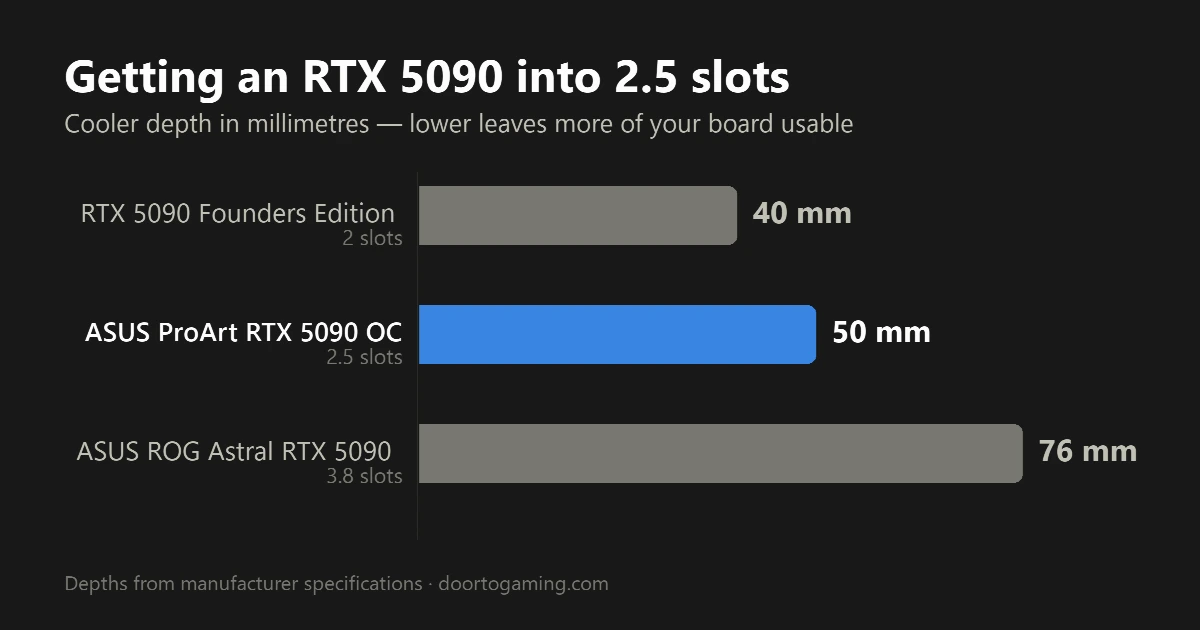
Most GeForce RTX 5090s are absurd objects. To wrangle a 575-watt Blackwell die, board partners have bolted on 3.5- and 4-slot coolers that swallow expansion slots, sag under their own weight, and turn "dual-GPU workstation" into a fantasy. ASUS's ProArt GeForce RTX 5090 OC Edition goes the other way: a matte-black, gold-trimmed card that folds the full-fat 5090 into a 2.5-slot, SFF-ready body. It's one of the more interesting flagships of this generation — not because it's faster, but because of what it refuses to waste.
What ASUS Actually Confirms
Here's what sits on ASUS's own spec sheet, separated from the marketing:
- GPU: NVIDIA GeForce RTX 5090 (Blackwell GB202), 21,760 CUDA cores
- Clocks: 2,482 MHz boost by default, 2,512 MHz in OC mode
- Memory: 32GB GDDR7 at 28 Gbps on a 512-bit bus — roughly 1.79 TB/s of bandwidth
- Size: 2.5 slots, 304 x 140 x 50 mm, SFF-ready
- Power: a single 16-pin (12V-2x6) connector; ASUS recommends a 1000W PSU
- Cooling: vapor chamber, twin 115 mm Axial-tech fans, double-vented backplate
- Display: 1x HDMI 2.1b, 2x DisplayPort 2.1b, and — unusually — 1x USB-C
- Interface: PCIe 5.0 x16
ASUS doesn't publish a separate board-power number, so treat this as a reference-power card: the RTX 5090's 575W total graphics power stands. The factory overclock is deliberately modest — about 100 MHz, roughly 4%, over NVIDIA's 2,407 MHz reference boost. That restraint tells the whole story. ProArt tunes for stability and repeatable numbers, not leaderboard screenshots.
Why 2.5 Slots Is the Whole Point
A 2.5-slot flagship sounds like a footnote until you try to build with the alternative. Four-slot cards physically block the PCIe lanes underneath them, so your capture card, 10GbE NIC, or second GPU has nowhere to go. Shrink the cooler to 2.5 slots and the board opens back up.
That matters most in two places. The first is small-form-factor builds — ITX and compact workstations where a 4-slot card simply won't close the case. The second is multi-GPU density: render nodes and AI rigs that want two or more 5090s in one chassis.
One honest caveat, because the marketing leans on the "workstation" word: there is no NVLink on the RTX 5090. NVIDIA stripped it from consumer cards generations ago, so two ProArt 5090s don't fuse into one 64GB pool — each keeps its own 32GB, and your software has to address them as separate GPUs. For renderers like Blender, OctaneRender, or Redshift, and for LLM inference that shards across cards, that's fine. If you were dreaming of pooled memory, this isn't it.
The Cooling Math: 575 Watts in a Slimmer Jacket
Respect the tension here: you don't make 575 watts easier to cool by making the heatsink smaller. ASUS's answer is a vapor chamber, a premium thermal interface, and twin 115 mm Axial-tech fans in a flow-through layout, with a double-vented backplate the company claims improves airflow by around 11%.
Early coverage suggests it works — but understand the tradeoff. Traditional workstation cards use blower coolers that fire hot air straight out the back of the case. That's loud, but it's why you can stack them: a blower doesn't dump exhaust on the card beside it. The ProArt uses open axial fans with a flow-through section, which recirculate heat back into the chassis. For a single card in a well-ventilated case, axial wins on noise and temperatures. Pack two flow-through 5090s shoulder to shoulder, though, and they breathe each other's heat — so a multi-GPU ProArt box needs serious case airflow a blower wouldn't demand. Smaller cooler, same watts: expect the fans to spin up under sustained render or training loads.
Blackwell, in Brief
Whatever jacket it wears, the silicon underneath is NVIDIA's flagship. The RTX 5090 shipped in January 2025 on the Blackwell architecture with 21,760 CUDA cores and, crucially for this card's audience, 32GB of GDDR7. That memory pool is the real headline: it's what lets you hold massive 3D scenes, multi-layer 8K timelines, and sizable AI models in VRAM without spilling to system memory.
Blackwell also adds native FP4 support, roughly doubling low-precision AI throughput and letting quantized models fit more comfortably inside 32GB. ASUS lists 3,352 AI TOPS. If your work is diffusion models, local LLMs, or GPU rendering, that combination — not frame rates — is the pitch.
Built for Work, Not for Show
Everything about the presentation says office, not battlestation. No RGB. A clean black shroud with gold accents that looks at home beside a ProArt display. The USB-C output is a genuinely useful, creator-minded touch for single-cable monitors and some pro panels — you won't find it on the Founders Edition.
One correction worth making, since it has circulated widely: there is no Adobe Creative Cloud subscription in the box. ASUS's spec page lists its GPU Tweak III tuning utility, MuseTree software, and NVIDIA's Studio and Game Ready drivers — nothing more. The Studio driver branch is the meaningful inclusion, since it's the validated, stability-focused driver that creative apps certify against.
Price, Availability, and the Catch
This is where enthusiasm meets reality. ASUS has not published an official US MSRP. The card had a quiet rollout — the product page appeared in May 2026 — and it went on sale in Japan on July 3, 2026 at ¥790,800. It's now stocked at US retailers such as Micro Center.
For context, NVIDIA's baseline 5090 MSRP is $1,999, but real-world 5090s have sold well north of that all year. This one has surfaced around and above $4,000 at retail, with a European listing near €3,899; one review pegged it close to $4,099. Treat any single figure as a moving target and check the listing in front of you.
Who Should Actually Buy It
Not gamers. A gamer spending flagship money is better served by a cheaper 5090 with a bigger, quieter cooler, or an RGB-laden ROG model built to show off. Nothing about the ProArt's mild overclock or restrained looks is aimed at you.
This card is for a narrower, real audience:
- SFF builders who want no-compromise 5090 performance in a case a 4-slot card can't fit.
- Creators and AI developers who need the 32GB framebuffer and Studio-driver stability more than the last 3% of clock speed.
- Multi-GPU workstation builders who need the slot clearance to run two cards — and the airflow to feed them.
If you're one of those three, the ProArt RTX 5090 OC Edition is one of the few flagships that respects your build instead of fighting it. If you're not, you're paying a compactness premium for restraint you'll never use.
Tags: ASUS ProArt RTX 5090 RTX 5090 OC Edition ASUS RTX 5090 NVIDIA Blackwell GPU ProArt graphics card compact RTX 5090 creator GPU RTX 5090 workstation ASUS ProArt review RTX 5090 cooling Blackwell architecture AI workstation GPU 8K video editing GPU professional graphics card small form factor GPU
Written by Shujaat Ahmed
Shujaat Ahmed is the founder and editor of Door To Gaming. A lifelong gamer, he writes about the games, hardware, and industry news he cannot stop thinking about.